
Business IT
Small business backups: the 3-2-1 rule and why Microsoft 365 isn't a backup
Most small businesses we meet think they have a backup. Fewer have one they’ve ever tested. That’s usually discovered at the worst possible moment: after a laptop is stolen, a server fails, or ransomware locks every file on the network.
A backup is only worth something if you can get your data back from it, quickly enough that the business keeps running.
The 3-2-1 rule
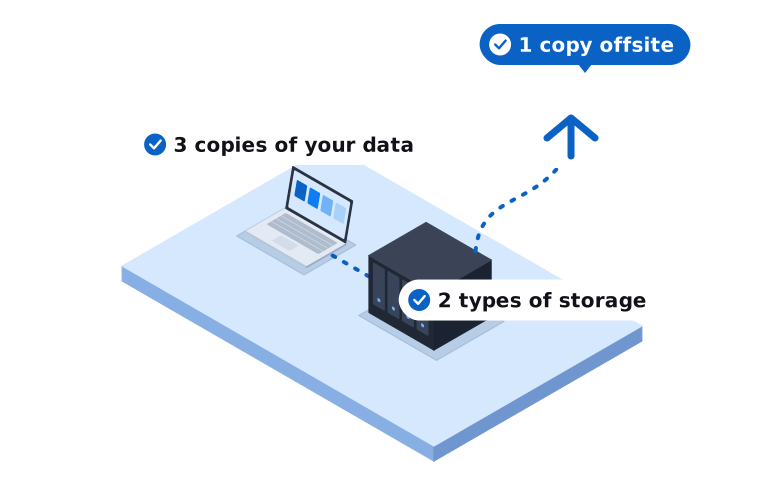
The 3-2-1 rule is a simple way to check whether your backup would survive a bad day:
- 3 copies of your data. The original, plus two backups.
- 2 different types of storage. For example, a backup drive in the office and a cloud backup service.
- 1 copy offsite. Somewhere a fire, flood or break-in at your premises can’t reach.
Many businesses now add one more rule: at least one copy should be offline or immutable, meaning it can’t be changed or deleted for a set period, even by an administrator. That matters because ransomware looks for backups and tries to encrypt or delete them too. A backup drive that’s always plugged into the server is not much protection against that.
“But everything’s in the cloud”
This is the most common misunderstanding we see. Moving email and files into Microsoft 365 or Google Workspace is a good step, but it isn’t the same as having a backup.
Microsoft and Google keep their services running and protect against their own hardware failing. What they don’t promise is to restore your data if:
- A staff member deletes a folder and nobody notices for months
- A departing employee’s account is removed and their mailbox goes with it
- Ransomware on a laptop syncs encrypted files up to OneDrive or SharePoint
- Someone gets into an account and deletes or changes data
Both platforms have recycle bins and some retention settings, but they’re limited and they weren’t designed as a full backup. Microsoft’s own Services Agreement recommends that customers regularly back up the content they store in its services. A separate backup of your Microsoft 365 or Google Workspace data closes that gap.
What should be backed up
Make a list. For most small businesses it includes:
- Email, calendars and contacts
- Shared files (SharePoint, OneDrive, Google Drive, or a file server)
- Accounting data, if it isn’t already in a cloud system like Xero or MYOB online
- Line of business software and its database
- Any server or computer that holds data that isn’t stored anywhere else
- Website files and databases, if you host your own site
Don’t forget the less obvious ones, like a reception PC that quietly holds the only copy of the appointments system.
Two questions that matter more than the technology
How much data can you afford to lose? If the backup runs once a night and the server fails at 4pm, you lose a day’s work. For some businesses that’s fine. For others it’s a disaster. The answer tells you how often backups need to run.
How long can you afford to be down? Restoring a whole server from a cloud backup over an NBN connection can take a long time. If you need to be back up within hours, you may need a local copy as well, or a backup that can run a copy of the server straight from the backup device.
There isn’t one right answer. A two-person office and a busy medical practice will land in very different places, and the backup plan should fit the business and the budget.
Test your restores
A backup that has never been restored is a guess. At least a few times a year, someone should:
- Restore a few files and check they open
- Restore a mailbox item
- For servers, do a test restore of the whole machine
Check the backup reports as well. We see backup jobs that have been quietly failing for months because an alert was going to an old email address.
Backups are part of cyber security
The Australian Signals Directorate includes regular backups as one of the Essential Eight, its baseline set of cyber security strategies for Australian organisations. Good backups won’t stop an attack, but they’re often the difference between a bad week and losing the business.
How we can help
We set up and monitor backups for small businesses across Melbourne’s south east and West Gippsland, including backup of Microsoft 365 and Google Workspace. We start by understanding how your business works, what you can’t afford to lose and how quickly you need to recover, then recommend something that fits your budget. We also test restores, so you know it works.
Call us on 03 9970 9107 or get in touch to talk it through.
Need a hand with this?
Tell us what's going on. We'll explain your options in plain English.